
Optimising your business inventory management is highly important. It cuts operational costs, makes things run more efficiently, and ensures customer satisfaction.
Optimising your business inventory management is highly important. It cuts operational costs, makes things run more efficiently, and ensures customer satisfaction.
Odoo has applications and modules to make your inventory or stock management easier and to keep everything moving smoothly from suppliers to customers.
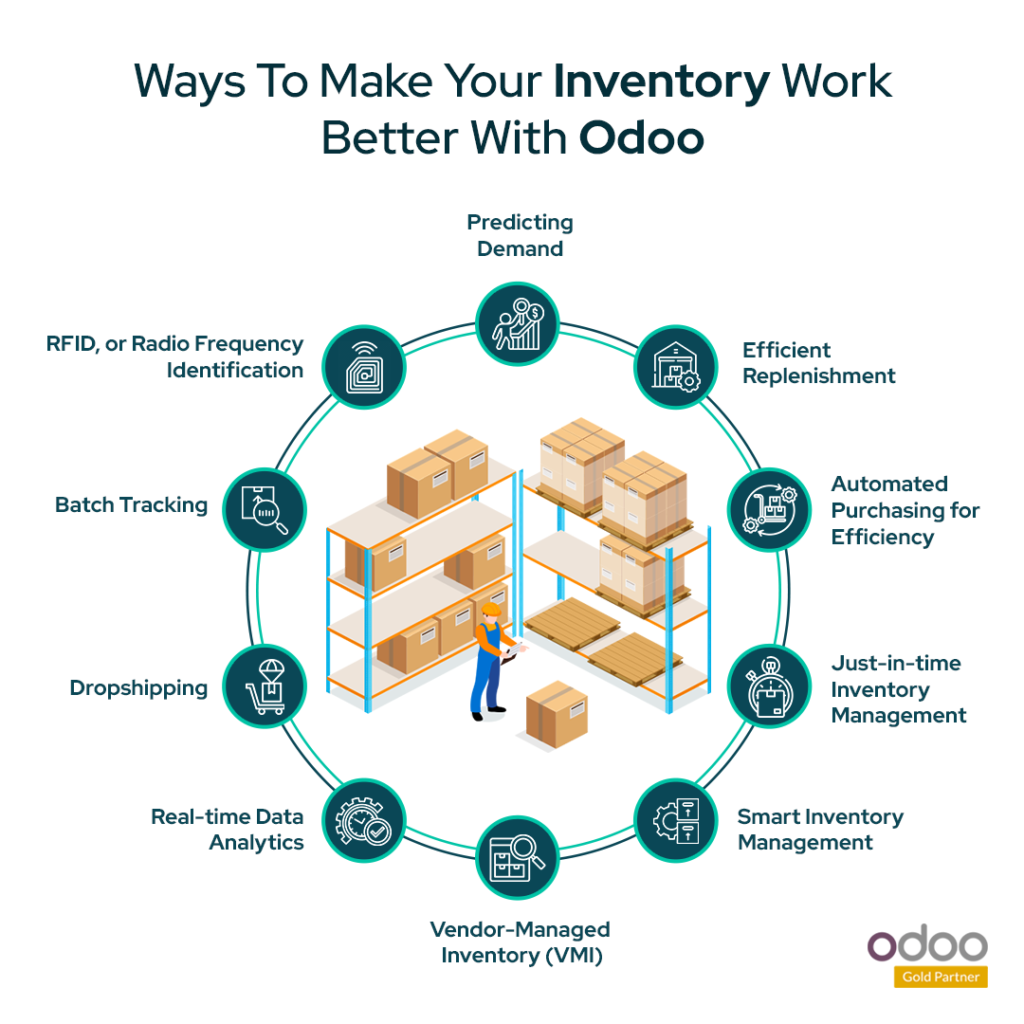
This blog will go through ten ways you can make your inventory work better with Odoo ERP software. And the best part is, you can customise it to fit exactly what your business needs.
But before you explore all that, let’s talk about why having optimised inventory matters so much.
Proper inventory management means saving money while making sure you always have what your customers want. Businesses can get the perfect balance of stock using software such as Odoo ERP software. This helps to reduce surplus stock and improve efficiency.
The Significance of Inventory Optimisation
Why should you use Inventory management software for optimising your business inventory?
Here are 10 ways to make your inventory work better with Odoo:
Predicting Demand:
With Odoo’s demand forecasting, you can guess what you will need in the future. This helps keep just the right amount of stock. By looking at past data and what’s happening now, you can avoid running out of things or having too much. That saves money and keeps customers happy.
Odoo’s Master Production Schedule (MPS) uses past and current manufacturing data to guess what you will need next. To use it:
Here are the steps for using Odoo’s Master Production Schedule (MPS).
Efficient Replenishment:
With Odoo, you can make restocking easier, saving money by not having too much extra stock lying around. Odoo also helps make customers happier by making sure orders are filled on time.
Here’s how it works:
Automated Purchasing for Efficiency:
Automating purchases is super important for keeping your inventory in check. Odoo’s Inventory Module works hand-in-hand with purchase management to make things smooth. It helps by automatically creating purchase orders, keeping an eye on how well your suppliers are doing, and making sure you are managing those relationships right. This means you will always have the right stock when you need it, and you won’t have too much lying around.
With Odoo 17, things get even easier. Businesses can make their procurement process simpler, saving time and money. Some cool features include setting up integration easily, automatically ordering more stock when you are running low, managing suppliers, setting up workflows just how you like them, and checking out reports to see how things are going.
Here are some of the best things about it:
Just-in-time Inventory Management:
Keep your inventory slim and costs low by using Odoo’s Lean Inventory Management, also known as Just-In-Time (JIT) management. This feature is extremely useful for businesses that make stock because it helps make sure you only make what you need. That means less chance of stock going bad or being wasted, which saves you money and makes things run smoother.
Here’s how to set it up with Odoo:
Smart Inventory Management:
Avoid running out of stock with Odoo’s smart inventory management. It is all about making sure you have enough stock to fill orders when they come in. This keeps customers happy and keeps them coming back for more. Using Odoo Inventory for safety stock management is like having a really organised and smart warehouse. It helps make sure you have got what you need, when you need it.
It offers features like:
Click here to also know about
“Explore the Features and Benefits of the Odoo Inventory Management Software”
Vendor-Managed Inventory (VMI):
Keep just the right amount of stock on hand and avoid running out with Odoo’s Vendor-Managed Inventory (VMI) tools. It is all about working closely with your vendors to make sure you have what you need when you need it, without having too much sitting around. This helps you save money and stay competitive.
With Odoo’s VMI feature, you can set up different ways to handle vendor bills, such as:
These features make it easier for companies to manage their inventory and payments, making the whole VMI process smoother and more efficient.
Real-time Data Analytics:
Make managing your inventory easier with Odoo’s live data analysis tools. These tools give you important information right when you need it. They help you make smart choices and grow your business in a sustainable way. How? By giving you a clear picture of what’s going on with your inventory, all the way from ordering to selling.
Here’s how to use Odoo’s live data analysis tools for inventory:
Dropshipping:
Make your retail business stronger by using dropshipping with Odoo. Dropshipping means you don’t have to keep products in stock. Also, this means you don’t need a lot of money upfront, you don’t have to worry about managing a big inventory, and you can offer more stock to your customers. But there are some problems with dropshipping too. Sometimes you can’t control the quality of the products or how long it takes for them to get to your customers. You also have to rely a lot on your suppliers, and there’s more competition, which can mean less money for you.
Odoo Inventory has some useful features for dropshipping businesses, like:
These features help dropshipping businesses manage their inventory better, avoid running out of stock, and make sure orders get to customers on time.
Batch Tracking:
Make sure your products are top-notch and easy to manage with Odoo’s batch tracking feature. It helps you keep track of where your products came from and where they’re going. This is important for following rules and making sure your inventory is correct. But, there are some things to watch out for. It might mean more paperwork and keeping track of a lot of batches at once. And sometimes, the data might not match up exactly. But it is important to deal with these challenges.
Here’s how to track products by batches:
RFID, or Radio Frequency Identification:
RFID, or Radio Frequency Identification, is a technology used to make inventory management easier. With Odoo’s RFID feature, you can track your products in real-time as they move through your supply chain. This helps you run your business better and keeps everything safe. But there are some things to think about, like it can cost a lot to set up at first, and you need to make sure it works with your other systems. Also, some people worry about privacy.
Here’s how RFID works with Odoo:
Odoo is a robust tool for making your inventory work better. Moreover, it has tools to make things easier and help you do your job better. It can figure out what you will need in the future and give you updates on what’s happening right now. This helps you keep just the right amount of stock on hand, save money, and make your customers happy.
Also, with Odoo ERP software, you can handle tricky inventory stock without any hassles. This sets you up for long-term success and makes your business stronger. Get in touch with us at Envertis, an experienced ERP solution provider and a gold Odoo partner in Sydney, to see how Odoo can make your business even better.
Get free consultation and let us know your project idea to turn it into an amazing digital product.

Se 506, 8 Help Street, Chatswood, NSW 2067
324 Queen Street, Brisbane, QLD 4000
171 Collins Street, Melbourne, VIC 3000