
Messy customer data always shows up when you least expect it. You send out the same invoice twice. Two people end
Messy customer data always shows up when you least expect it.
You send out the same invoice twice. Two people end up calling the same lead. And suddenly, that quick report takes all afternoon.
Most of the time, it comes down to one thing: customer records got imported without a plan, and now you have duplicates.
This guide is for Australian SME teams and Odoo administrators, and it offers a straightforward way to import and clean up customer data in Odoo. You will also learn when to call in experienced Odoo service providers.
You do not need to be a developer to get this right. You just need a method, a bit of patience, and a solid grasp on how Odoo recognises whether a record is new or already in the system. Once you nail that, duplicate data stops being a headache.
Bad data is not just an irritation. It carries a real price.

For a smaller Australian business, the dollar figure is lower, but the drag on productivity lands just as hard, because your team is smaller and every wasted hour counts.
Customer data is often the worst offender.

When the same customer appears three times in your database, every connected process inherits that mess.
Here is what Odoo duplicate customer records tend to break in day-to-day operations:
| Business Area | What Duplicate Records Break |
| Sales and CRM | Two reps work the same lead and pipeline value is overstated |
| Invoicing | Payments apply to the wrong contact and statements do not reconcile |
| Marketing | Customers receive the same email twice, and unsubscribe rates rise |
| Reporting | Customer counts and revenue per customer come out wrong |
| Support | History is split across records, so agents miss important context |
Start With a Clean Source File Before You Touch Odoo
The best duplicate is the one that never enters the system.
A large share of a smooth import is decided in the spreadsheet, well before you pick Odoo implementation services. Treat your CSV or Excel file as the single source of truth and get it in order first. A tidy file imports faster, is easier to troubleshoot, and is far less likely to leave you cleaning up afterwards.
Standardise Your Fields
Inconsistent formatting is what fools both people and software into creating duplicates.
“Jones Pty Ltd”, “Jones Pty. Ltd.” and “JONES PTY LTD” look identical to a person and completely different to a database. Before you import customer data in Odoo, tidy the source with a consistent set of rules.
Work through this pre-import data hygiene checklist:

If you want to stop duplicate records in Odoo, focus on one key thing: the External ID. Every record can have a unique External ID, or XML ID. Think of it as a permanent name tag that never comes off while the record lives in your system.
Whenever you import data, Odoo checks the External ID from your file and looks for it in the database. If it finds a match, Odoo updates that record. If not, it creates a fresh one. This process keeps your updates clean and prevents your database from filling up with duplicates every time someone uploads a spreadsheet.
Choose a Reliable Unique Key
Now, if your data doesn’t already use External IDs, pick a field that is truly unique for every record. For individuals, use email addresses. For companies, a customer or account reference works much better than the business name. Company names often get shortened, misspelled, or repeated, so matching on them is just asking for trouble.

Once your file is clean and your unique key is in place, the Odoo customer data import itself is straightforward.
Here is the sequence a careful administrator follows, whether you are loading Contacts or running an Odoo CRM data import.
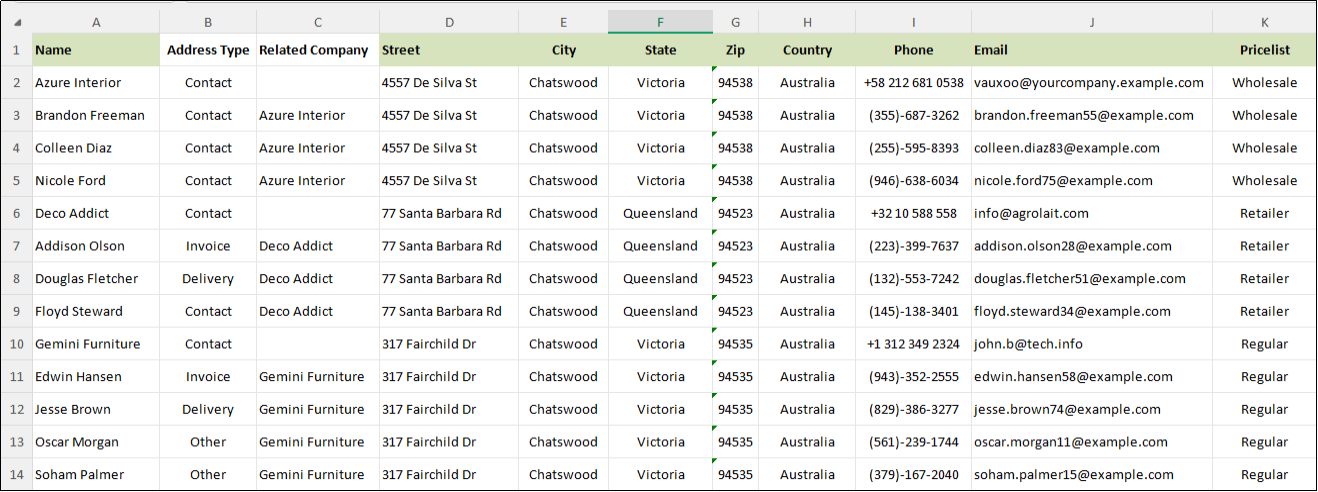
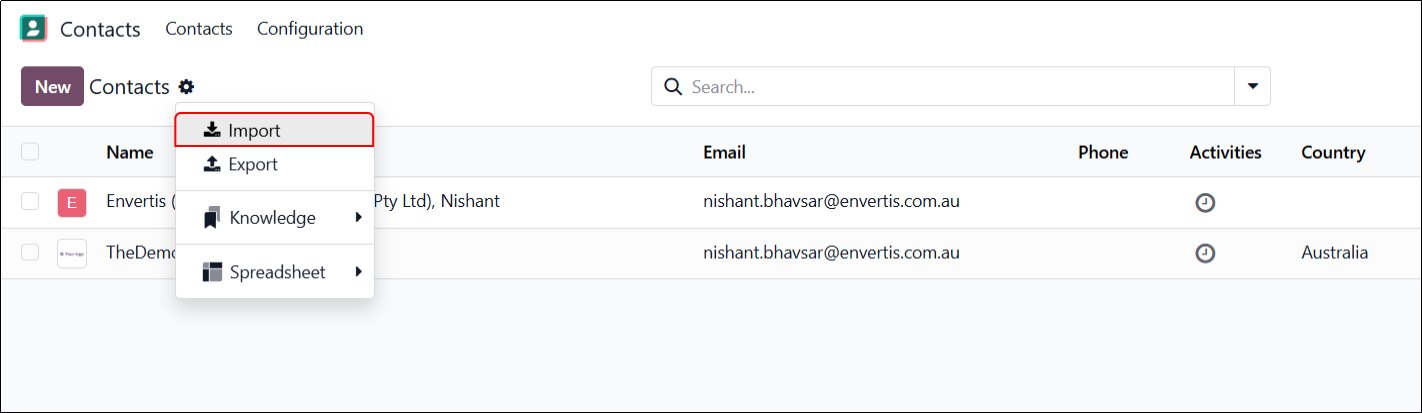
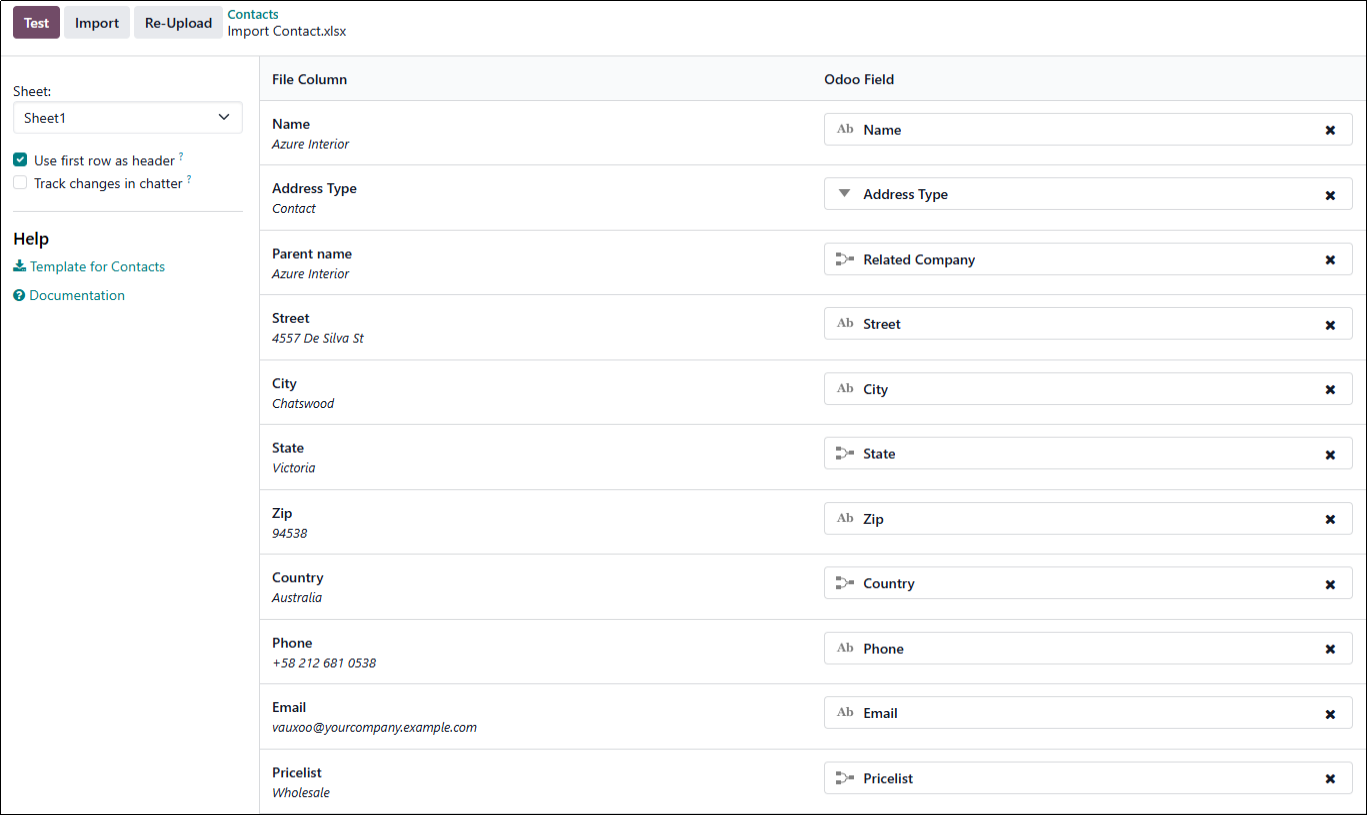
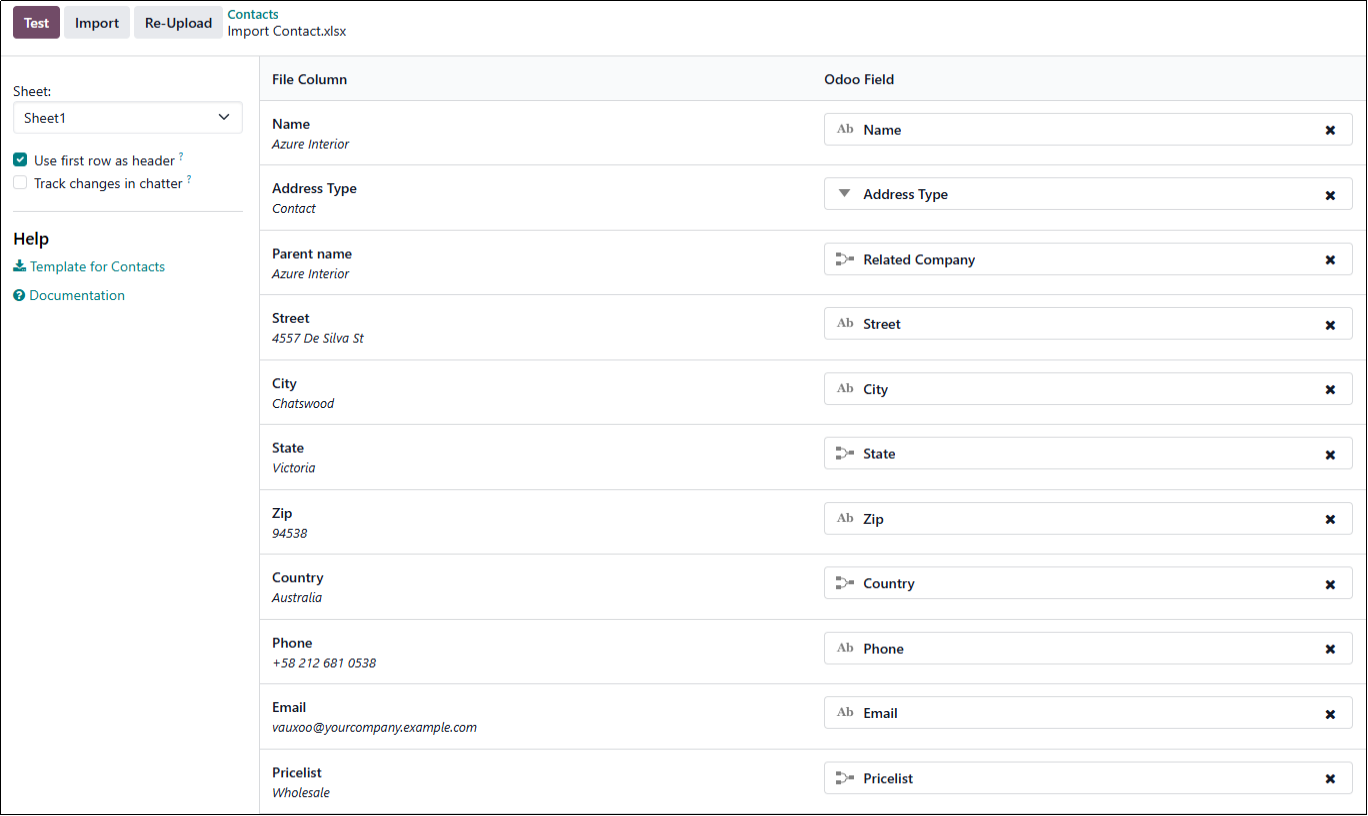
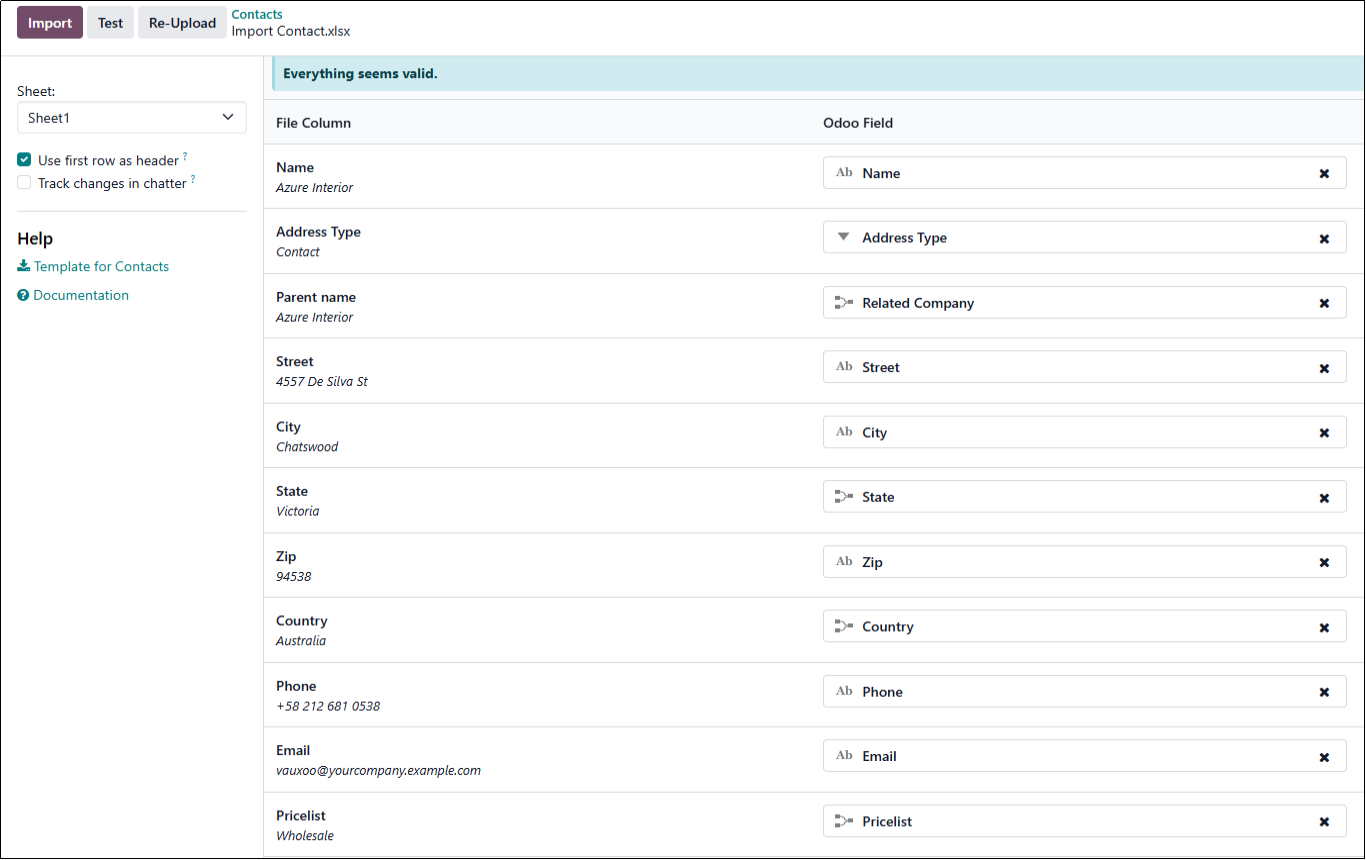
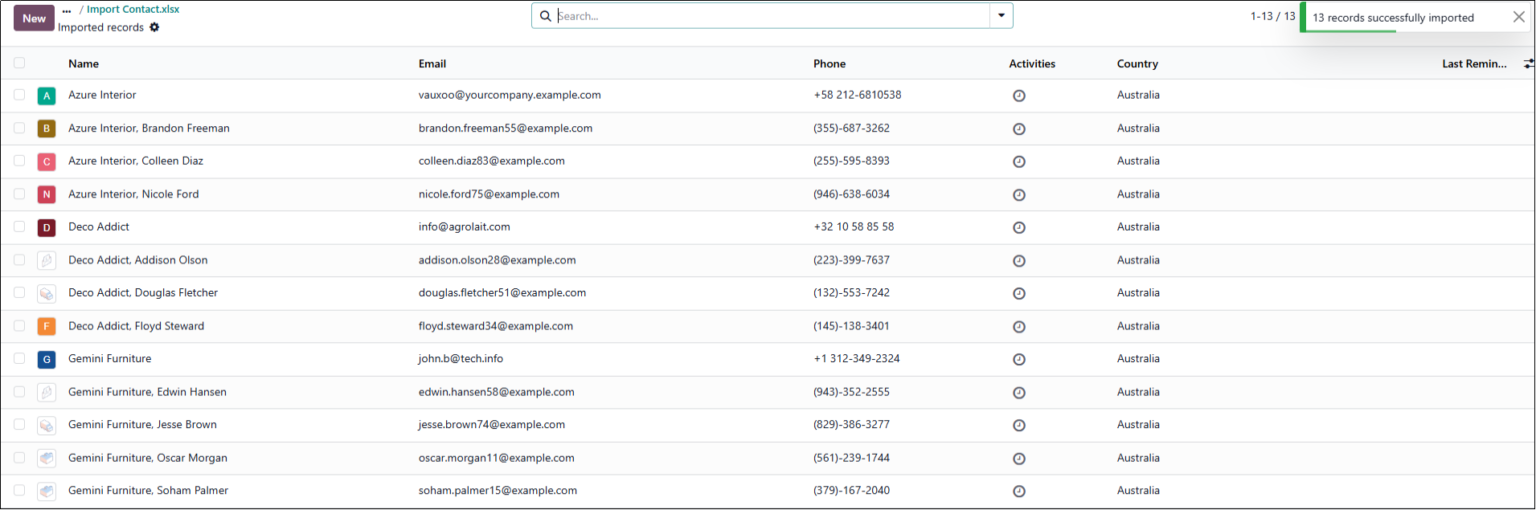

Odoo checks every row against the destination model’s rules. If it finds a single bad value, it stops everything. The error message usually shows exactly which row and field caused the issue. Read it closely rather than re-uploading and hoping the problem sorts itself out.
| Error | Likely cause | Quick fix |
| Missing required field | Blank Name or another mandatory column | Fill the cell or remove the empty row |
| Wrong data type | Text sitting in a number or date field | Use valid values, for example 2026-08-24 for a date |
| Related record not found | A reference points to data not yet imported | Import the linked record first and check spelling |
| Duplicate created | No unique key or External ID was mapped | Map email or External ID and re-run as an update |
| Invalid selection value | Value is not in Odoo’s allowed list | Match the exact option shown in the form view |
| Permission error | The user cannot create or import records | Import using an administrator account |

Perhaps the duplicates already exist, and the damage is done. The good news is that Odoo gives you practical tools for Odoo data cleaning without a line of custom code so that you can tidy the database from the standard interface.
The Data Cleaning App
Recent versions of Odoo include a Data Cleaning application built around three useful features:
Merge Contacts Manually
For smaller jobs, select the duplicate contacts in the list view and use the merge option. Odoo keeps the history and reassigns related documents to the record you keep, so you clean up the clutter without losing anything important.

Some imports are simple. Your in-house admin can tackle them without much trouble. Others do not. It is smart to know where that line is, so you don’t waste time struggling through high-risk jobs that are better left to experts.
You want Odoo consulting companies in situations like these:
That is where real specialists pay off. Expert Odoo ERP consultants can design a migration that actually fits your business, not just the software. Odoo integration services keep your systems in sync, without creating extra duplicates. Odoo customisation services and Odoo development services handle the edge cases a standard import cannot, and ongoing Odoo support services keep your data healthy long after go-live.
Envertis, a certified Odoo Gold partner, has rolled out over 200 Odoo implementations for Australian businesses since 2006. Our teams across Sydney, Melbourne, Brisbane, Adelaide, and Perth make sure SMEs get their customer data imported, cleaned, and set up right the first time.
When you are choosing Odoo consulting partners, find one that cares about your data as much as you do and sticks around to support you long after that first import.

Frequently Asked Questions
Map a unique field, ideally the External ID, so Odoo recognises existing records and updates them instead of adding new ones.
Both work well. CSV suits large, structured imports and automation, while Excel is convenient when you want to review rows as you map them.
Usually because a linked record does not exist yet, or the name has extra spaces or a typo. Import related records first and trim your fields before you try again.
Yes. Use the Data Cleaning app’s deduplication feature, or the manual merge option in the list view. Both keep the linked documents on the record you decide to keep.
Test on a small sample, import into a staging database, confirm the result, take a backup, then run the same process on your live system.
Not always. Standard imports and the Data Cleaning app cover most needs. For complex migrations or custom rules, experienced Odoo service providers can save you significant time and risk.
Get free consultation and let us know your project idea to turn it into an amazing digital product.

Se 506, 8 Help Street, Chatswood, NSW 2067
324 Queen Street, Brisbane, QLD 4000
171 Collins Street, Melbourne, VIC 3000